Contents
- What is a virtual queue?
- How does a virtual queue work for customers?
- How does a virtual queue work for staff?
- Which notifications should a virtual queue use?
- Where do virtual queues work best?
- What are the common objections to a virtual queue?
- Virtual queue set-up checklist
- How do you measure whether a virtual queue is working?
- The short version
A virtual queue is a line that customers join from their phone instead of standing in. They scan a QR code or tap a link, give a name and mobile number, and wait wherever they like while a live page shows their place. When it's their turn, they get a text, WhatsApp message or notification.
It's one type of queue management system, and for most small businesses with walk-ins it's the one that changes the most. This guide covers how a virtual queue works from both sides of the counter, which notification channels to use, where it fits and where it doesn't, and a checklist for setting one up.
What is a virtual queue?
A virtual queue (also called a virtual line or virtual waitlist) keeps the order of a physical queue but removes the need to stand in it. Each customer holds a place on a list, not a spot on the floor. The business calls people from the list, and the customer comes back when they're called.
The idea isn't new. Restaurants have handed out buzzing pagers for years, and theme parks sell timed return slots. What's changed is that everyone now carries the pager: their own phone.
Physical vs virtual queue
| Physical queue | Virtual queue | |
|---|---|---|
| Where people wait | In the line, in your shop or outside it | Anywhere: the car, a café, at home, browsing your shelves |
| What staff see | A crowd, and a guess at how many are waiting | A list with names, what each person wants and how long they've waited |
| If a customer steps out | They lose their place | They keep it, and the page tells them when to come back |
| What the customer knows | Their position, if they can count heads | Their position and an estimated wait, updated live |
| The data you get | None | Join times, wait times, serve times, no-shows, busy hours |
| Floor space | As much as the line needs | A QR code on the door |
The biggest difference is the last line of uncertainty. In a physical queue, the customer's only way to know where they stand is to stay put. In a virtual queue they're told.
How does a virtual queue work for customers?
From the customer's side, it should take under a minute and need nothing installed.
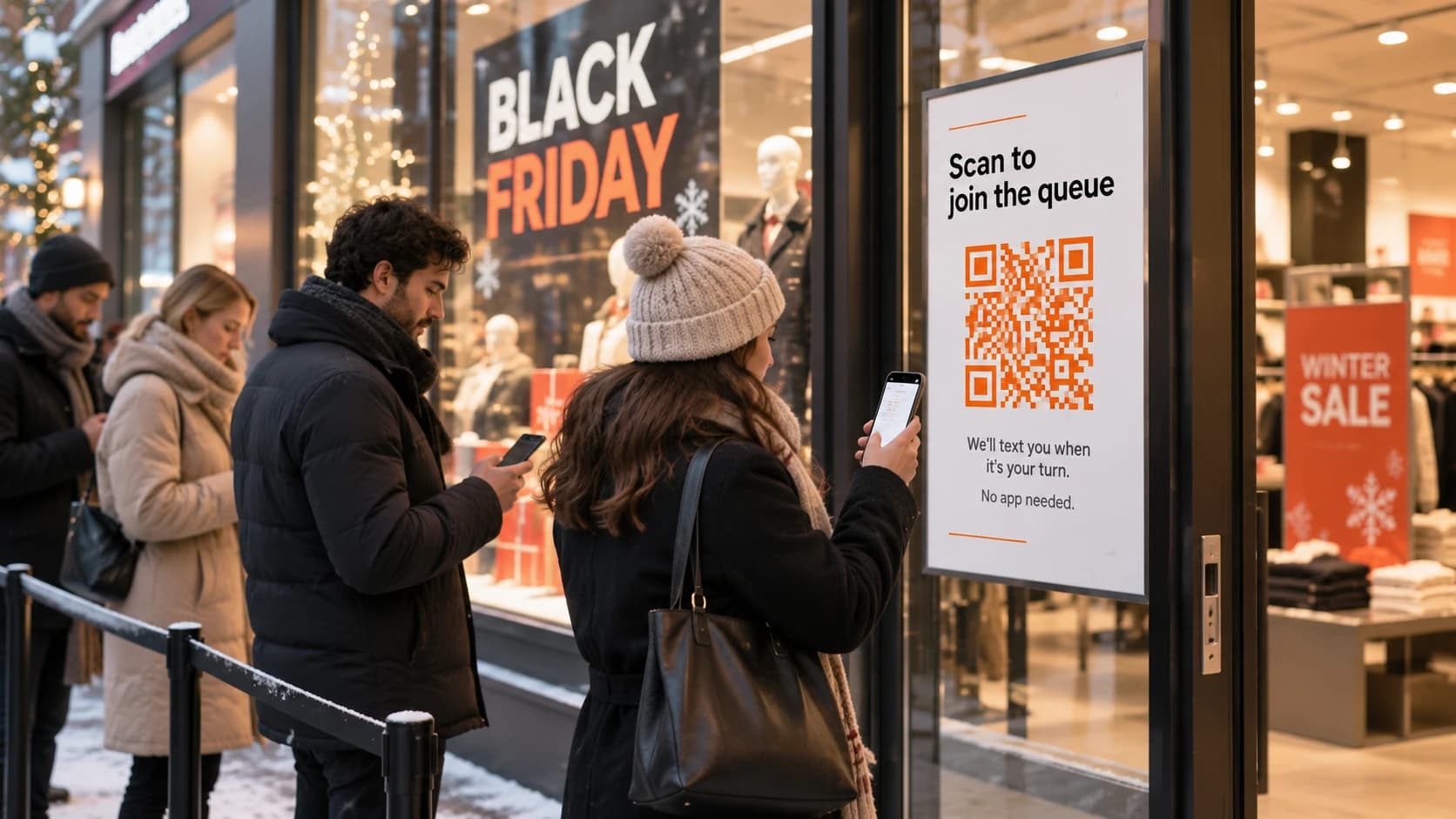
- Find the way in. A QR code on the door or counter, a link on your website or Google profile, or a member of staff who adds them at the desk.
- Join. A short form in the phone's browser. Usually a name and mobile number, perhaps a service or party size. No app, no account, no password.
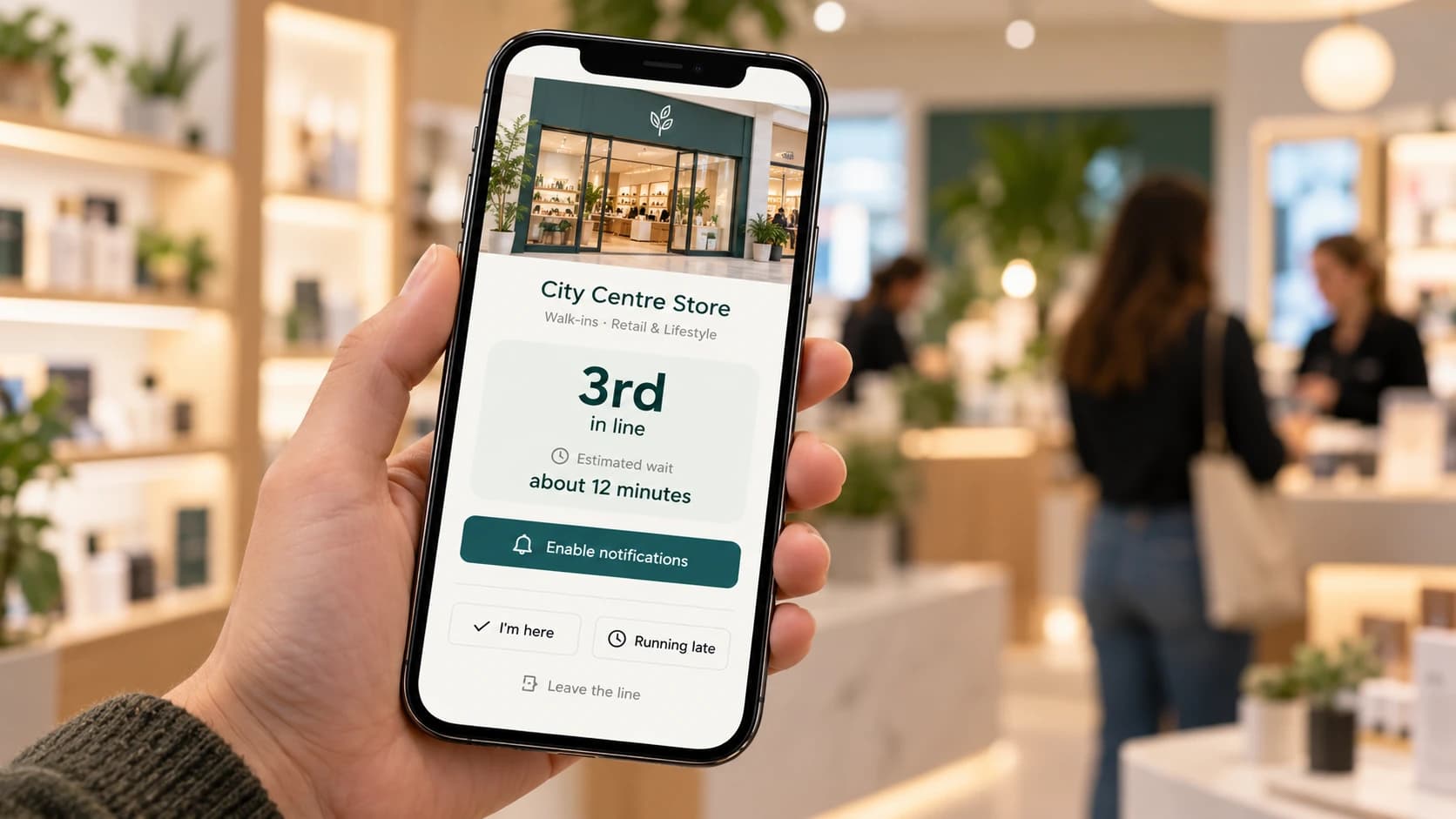
- Watch their place. They land on a status page showing their position and an estimated wait. It updates by itself as people ahead are served, so they don't have to keep refreshing or keep checking with staff.
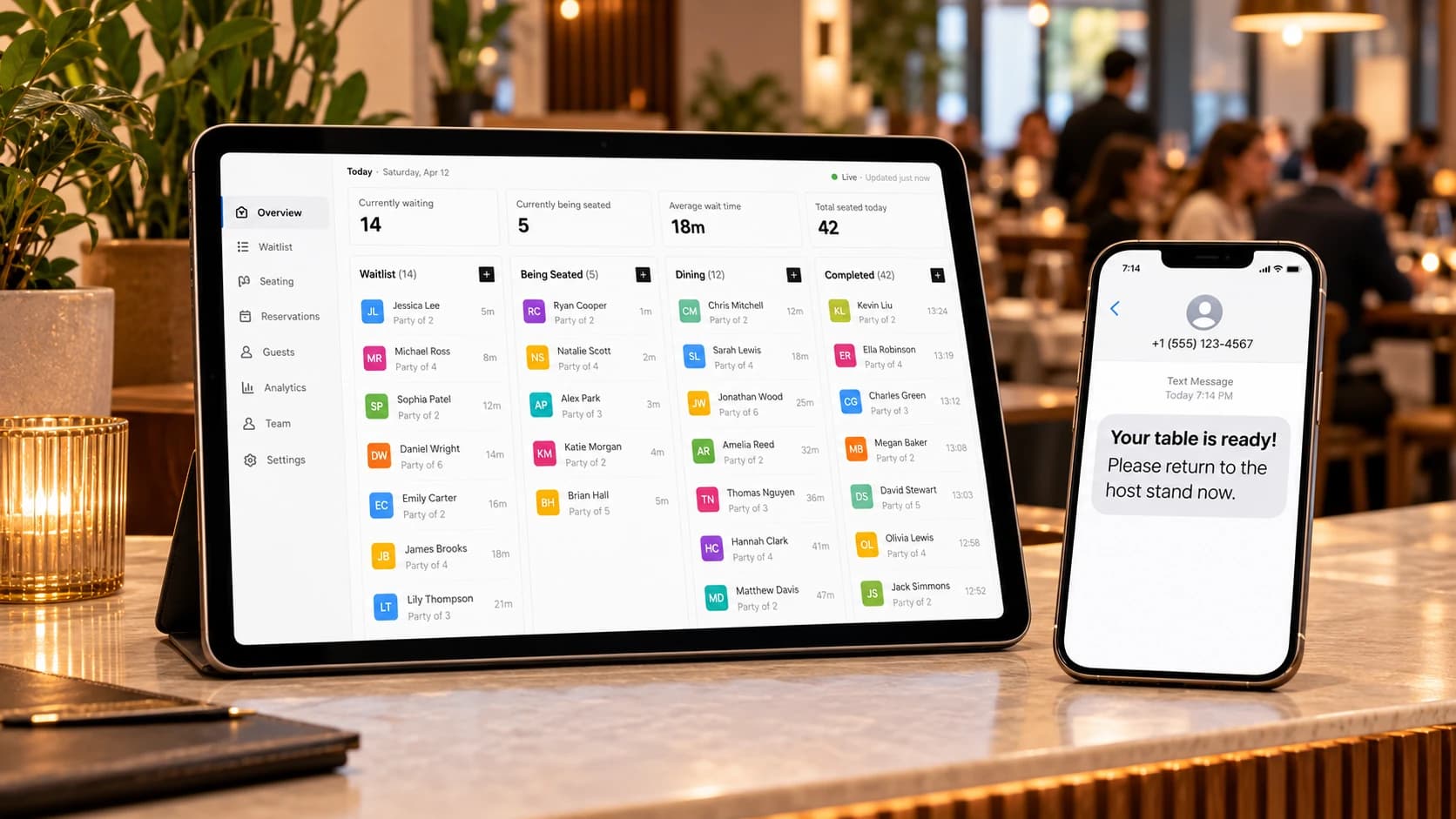
- Get the alert. When staff are nearly ready, the customer gets a message: "It's your turn" or "You're next". The message includes a link back to the status page.
- Check in. They come back to the counter. Some systems let them tap "I'm here" when they arrive, or "running late" if they're held up, so staff can call someone else first.
The status page is the heart of it. It's the customer's copy of the ticket, and it's what makes them trust they can leave. If it only shows a number, customers keep coming back to the counter to check. If it shows a position, an estimate and a way to say "running late", they stay away until they're called.
How does a virtual queue work for staff?
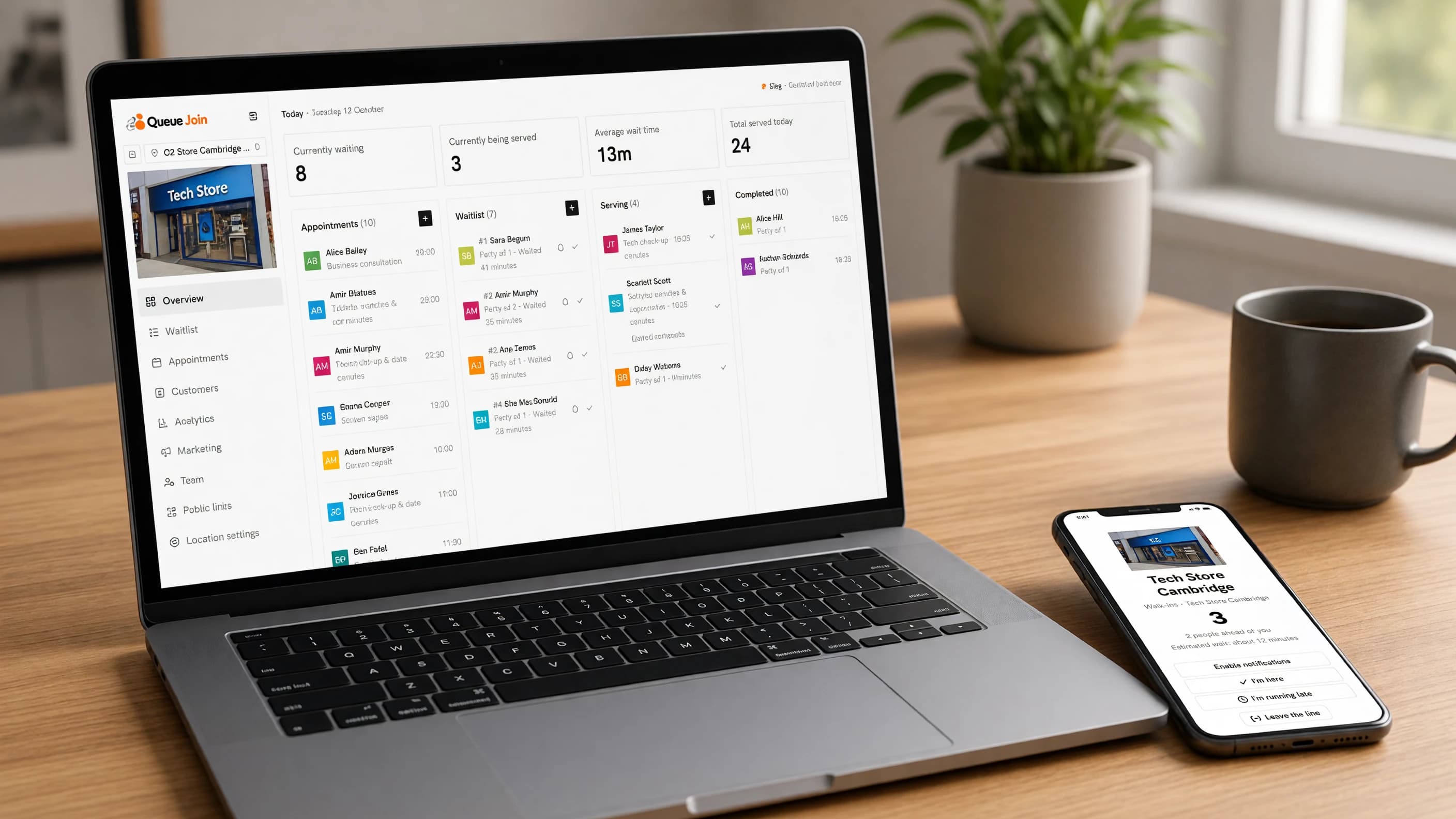
On the other side of the counter, the virtual queue is a screen, usually on a laptop, tablet or the phone in a manager's pocket.
The board
Staff see everyone waiting, in order, with how long they've waited and what they came for. People being served sit in a separate column, so nobody gets called twice. The board updates live: when someone joins from the door, they appear without anyone refreshing.
Calling the next person
There are usually two separate actions, and it's worth understanding the difference:
- Alert sends the "it's your turn" message while the customer is still waiting, so they start walking back.
- Serve (or "call", "start serving") moves them into the serving column when they're at the counter.
Alert early enough to cover the walk back. If most customers are browsing your shop, a minute is plenty. If they're in a café down the road, give them five.
No-shows
Some people won't come back. They got bored, found somewhere else, or never read the message. Staff mark them as a no-show and move on. A good system lets the customer leave the line themselves, which turns a wasted call into a clean exit, and some can mark a no-show automatically after a set time.
Adding a walk-in by hand
Not everyone wants to scan a code. The member of staff types in a name and number and the customer joins the same line, with the same alerts. A customer with no phone at all can still be added by name and called out loud. Nobody is excluded.
Which notifications should a virtual queue use?
The alert is the moment the whole thing exists for. If it doesn't arrive, or arrives late, the customer misses their turn and blames you. So the channel matters.
| Channel | Reach | Cost to the business | Confirms it was seen | Needs an app |
|---|---|---|---|---|
| SMS text | Any mobile phone | Paid per message segment, priced by country | No read receipt, only delivery | No |
| RCS | Phones and networks that support it, with SMS as fallback | Paid per message, similar to SMS | Delivery and read receipts where supported | No (uses the built-in messages app) |
| Customers who use WhatsApp | Paid per delivered message, by country | Delivery and read receipts | Yes, but most users already have it | |
| Web push | Customers who allow browser notifications | Free | No reliable receipt | No |
| Anyone whose address you hold | Close to free | Not reliably | No | |
| Voice call | Any phone | Paid per call minute | The call is answered (or goes to voicemail) | No |
A few notes on cost. Text messages are charged per segment: Twilio lists outbound SMS to UK mobiles at $0.056 per segment [2], and to US numbers at $0.0083 per segment plus a carrier fee [3]. WhatsApp business messages are charged per delivered message, at a rate that depends on the message type and the recipient's country [4], and providers add their own fee on top (Twilio's is $0.005 a message [5]).
In practice, the best set-up is a chain rather than a single channel:
- Send on a cheap channel that confirms delivery (WhatsApp, where your customers use it).
- Fall back to a text only if that didn't land.
- Add free web push and email alongside for the customers who've turned them on.
- Keep voice calls for the one moment that matters, "it's your turn", for customers who aren't looking at a screen.
That way most customers get one message, and nobody gets nothing.
Where do virtual queues work best?
Virtual queues earn their keep wherever customers wait more than a few minutes for a person, and would rather be somewhere else while they do.
- Restaurants and cafés. The party waits at the bar or goes for a walk instead of crowding the host stand. See restaurants and cafés.
- Clinics and surgeries. Patients wait in the car or at home instead of a crowded waiting room. See healthcare clinics.
- Shops with a service desk. Phone repairs, returns, click and collect. Customers browse instead of standing at the counter, and some buy something while they do. See retail stores.
- Barbers and salons. Walk-ins can pop out until a chair is free.
- Pharmacies, banks, council offices. Anywhere with a ticket machine today.
- Pop-ups and events. A queue that would otherwise snake round the block.
They also suit businesses that take bookings as well as walk-ins, as long as the tool knows about both. A salon with a 2pm booking can still let someone join the walk-in line at half past one, provided the system knows which stylist is free and when. Without that, staff end up keeping two lists and doing the sums in their heads.
A caution on very short waits
If your typical wait is under about five minutes, think twice. Scanning a code, typing a number and reading a message can take longer than just standing there, and customers will (reasonably) skip it. For short waits, a well-signed physical line is fine. Use the virtual queue for the busy hours, when the wait stretches, or keep it for one slow service and leave the quick one alone.
What are the common objections to a virtual queue?
"My customers are older"
Fewer of them use smartphones, but most do. In the US, Pew Research Center found in 2025 that 78% of adults aged 65 and over own a smartphone, against 91% of all adults [1]. The rest can still get a text on any mobile phone, or be added at the counter and called by name. A virtual queue doesn't take the old way away. It adds a better option for the people who want it.
If your customers really aren't phone users, an automated voice call for "it's your turn" covers the gap: it reaches landlines and the simplest mobiles, and nobody has to read anything.
"People will wander off"
Some will, and that's the point: they're not cluttering your doorway. The risk is that they wander too far to come back in time. Three things help:
- Show an estimated wait, so people judge for themselves how far they can go.
- Alert a little earlier than you need them.
- Let customers say "running late" so staff can call someone else first instead of waiting.
There's also some old psychology on your side. David Maister observed in 1985 that occupied time feels shorter than unoccupied time, and that uncertain waits feel longer than known ones [6]. A customer browsing with their place visible on their phone is having a much shorter-feeling wait than one standing in line wondering.
"It costs per text"
It can. Some tools charge per SMS on top of the subscription, sometimes with a mark-up. Before you choose one, check whether messages are included in the plan, what happens past the allowance, and whether there's a free channel (web push, email) or a cheaper one (WhatsApp) to cut the number of texts. A chain that sends WhatsApp first and a text only as a fallback sends far fewer texts than one that texts everybody.
Virtual queue set-up checklist
Ten things to do before the first real customer joins. Most take minutes.
- Decide your queues. Start with one. Add a second only for visits that genuinely move at different speeds or need different staff.
- List your services, if they matter. If knowing what each person wants changes how you prepare, ask. If not, don't.
- Set opening hours and a capacity limit. So nobody joins at midnight, or into a line you can't clear before closing.
- Keep the form short. Name and mobile number. Every extra field loses people.
- Choose your messages. Joined, next in line, it's your turn. Switch off anything customers don't need.
- Choose your channels. WhatsApp, text, push, email, voice: see the table above.
- Print and place the QR code. On the door or window, at the counter, on tables. Never only at the back of a line, where it's too late.
- Put the link online. Your website, your Google Business Profile and your social bios, so people can check the wait before they set off.
- Train the team. Three actions cover most of the day: add a walk-in, alert, and served. Show everyone, including Saturday staff.
- Run a trial week. Include your busiest day. Scan your own code on mobile data first, go through the whole journey, then watch what happens.
If you're using Queue Join, the printable poster on each QR code includes your business name, a clear call to join and the small print mobile networks require next to a code that signs people up for texts. See branded QR codes, and the status page guide for exactly what customers see after they join and what they can do from it.
FeatureBranded QR codesGenerate print-ready QR codes linked to a specific location or waitlist, styled with your branding.Learn moreHow do you measure whether a virtual queue is working?
Pick a few numbers and compare a normal week before with a week after. Three tell you most of what you need.
Average wait
How long people waited from joining to being served. A virtual queue doesn't make your staff faster, so don't expect this to drop much on its own. What it does is make the wait visible, so you can see when it spikes and put another person on.
Walk-away rate
The share of people who joined but were never served: they left the line, didn't come back or were marked no-show. This is the number a virtual queue should move most, because people who can wait elsewhere are less likely to give up. A rising rate usually means waits are too long or messages aren't arriving.
Served per hour
How many customers you serve in your busiest hours. If staff spend less time managing a crowd and calling out names, this tends to rise. It's also the figure to plan rotas around.
Queue Join's dashboard shows live counts on every plan (waiting now, being served, average wait and served today), and the full real-time analytics page, with no-show rates, busiest hours and comparisons by queue, service and branch, is on higher plans. See current pricing for which.
FeatureLive waitlist managementAdd walk-ins, call the next customer, and mark served or no-show in real time from any device.Learn moreThe short version
A virtual queue keeps your order of service and gives your customers their time back. They join from a QR code, watch their place on their phone and come back when they're told. Staff see the whole line on one screen and call people with a button.
Set up one queue, put the code on the door and run it for a week. If your waits are longer than a few minutes, you'll see the difference in the doorway on the first busy day.
Frequently asked questions
Sources
- Pew Research Center — Mobile fact sheet (2025)
- Twilio — SMS pricing for the United Kingdom (checked October 2026)
- Twilio — SMS pricing for the United States (checked October 2026)
- Meta — WhatsApp Business Platform pricing (checked October 2026)
- Twilio — WhatsApp pricing (checked October 2026)
- David Maister — The Psychology of Waiting Lines (1985)

About the author
Chris Hunter
CEO and founder of Queue Join, writing about running waitlists, bookings and customer messages for businesses that serve people in person.
More about Queue Join