Contents
- Why does the paper waitlist fail on a Friday night?
- How do you quote an accurate wait time by party size?
- How do you run walk-ins and reservations on one list?
- Buzzers, text or WhatsApp: how should you page guests?
- How do you keep waiting guests from walking away?
- How do you handle party size, high chairs and accessibility?
- What should you do about no-shows and guests who leave the queue?
- How do you use waitlist data to plan busy nights?
- What should you look for in a restaurant waitlist app?
- A Friday night, start to finish
Restaurant waitlist management means taking walk-in parties when every table is full, quoting each an honest wait, keeping them nearby while they wait, and seating them in a fair order the moment a table frees up. Done well, it turns a full room into extra covers, not a doorway of people who give up.
This guide covers the host stand from end to end: how to quote a wait by party size, how to run walk-ins and reservations from one list, how to page guests, what to do about no-shows, and which numbers to look at on Monday morning. It's written for independent restaurants, cafés and small groups, but the method works at any size.
Why does the paper waitlist fail on a Friday night?
A paper list works until the room is full and the door is busy at the same time. Then it breaks in four predictable ways.
- Nobody can leave. The list has a name and a party size, but no way to reach anyone. So guests stand in your entrance, blocking the door and the takeaway collections, because they're afraid of missing their name being called.
- The quotes are guesses. The host glances at the room and says "about twenty minutes". Twenty minutes later the guest comes back to ask, and the host has no better answer, because the paper doesn't know which tables are about to turn.
- The order gets lost. Crossed-out names, a two squeezed in between two fours, a party who stepped outside and came back. By nine o'clock nobody is sure who's next for a four-top.
- You learn nothing. The sheet goes in the bin at close. You don't know how many parties you turned away, how long people actually waited or which quarter-hour was the real peak.
None of this is the host's fault. A paper list can only hold names, while the job needs times, phone numbers and an order that holds up when things change. That's what a digital restaurant waitlist adds. If you're new to the idea, our guide to virtual queues explains the general model, and what a queue management system is covers the wider category.
How do you quote an accurate wait time by party size?
Quote each party from the tables that can actually seat them. Work out how often a table of that size frees up (your average turn time divided by the number of those tables), then multiply by the party's place in line for that size. Round up and give a range, not a single number.
The mistake most hosts make is quoting from the whole list. If there are six parties ahead, a couple hears "it's a long wait" when four of those parties are sixes waiting for your two big tables. The couple's real wait depends only on your two-tops.
The host-stand method
- Group your tables by size. Two-tops, four-tops and anything that seats five or more. If you push tables together on busy nights, count the pushed configuration you actually use.
- Know your turn time for each group. This is how long a party usually occupies the table, from sitting down to the table being reset. Couples are quicker than families. If you've never measured it, time a dozen tables of each size across two busy nights.
- Work out how often a table frees up. When the room is full and seating has been staggered through the evening, a table of each size comes free roughly every turn time ÷ number of tables.
- Multiply by place in line. The third two waiting for a two-top waits about three of those intervals.
- Round up and give a range. Add a few minutes for clearing and resetting, round to the next five, and quote it as "25 to 30 minutes". A guest who's seated early is pleased. A guest seated late after a precise promise is not.
A worked wait-quote table
Picture a 20-table neighbourhood restaurant with eight two-tops, eight four-tops and four tables for six. These turn times are an illustration; use your own.
| Party size | Tables | Average turn | A table frees up about every | 1st in line | 3rd in line | 5th in line |
|---|---|---|---|---|---|---|
| 1–2 | 8 | 60 min | 7–8 min | 10–15 min | 25–30 min | 40–45 min |
| 3–4 | 8 | 75 min | 9–10 min | 10–15 min | 30–35 min | 50–55 min |
| 5–6 | 4 | 90 min | 22–23 min | 25–30 min | 70–75 min | about 2 hours |
Two things stand out. Small parties move quickly even when the room looks packed, so it's worth telling couples a real number instead of waving them away. And a third or fifth large party in line faces a long wait, so that's the moment to offer them a split table, the bar, or a booking for another night.
The method assumes tables are turning at a steady rate. It runs fast just after you open, when every table sat down at once and nothing is close to finishing. In that first hour, quote from the tables you can see on dessert, not from the formula.
Wait times have a whole post of their own:
How do you run walk-ins and reservations on one list?
Put both in one view of the evening. The host needs to see the bookings due in the next hour and the walk-ins waiting, side by side, because every walk-in you seat at 7:30 is a table that won't be free for the 8:00 booking.
The rules that make this work are simple, but they need to be written down so every host applies them the same way.
- Hold tables for bookings, but not forever. Decide which tables are protected for reservations and from what time. A four-top booked for 8:00 can take a walk-in at 6:30 if your turn time for fours is comfortably under 90 minutes. At 7:15 it can't.
- Set a grace period for late bookings. Fifteen minutes is common. After that, the table goes to the waitlist and the late party joins the list like anyone else. Say so in your booking confirmation, not just at the door.
- Set a hold time for walk-ins too. Once a waiting party has been told their table is ready, hold it for 5 to 10 minutes. Then move on. Tell them the hold time when they join.
- Seat in order within each table size. A two who joined after a six can take a free two-top first, because the six could never have used it. That's fair, and you can explain it in one sentence at the door.
- Quote walk-ins around the bookings. If two of your four-tops are booked at 8:00, a walk-in four joining at 7:40 is waiting for six four-tops, not eight. Adjust the quote.
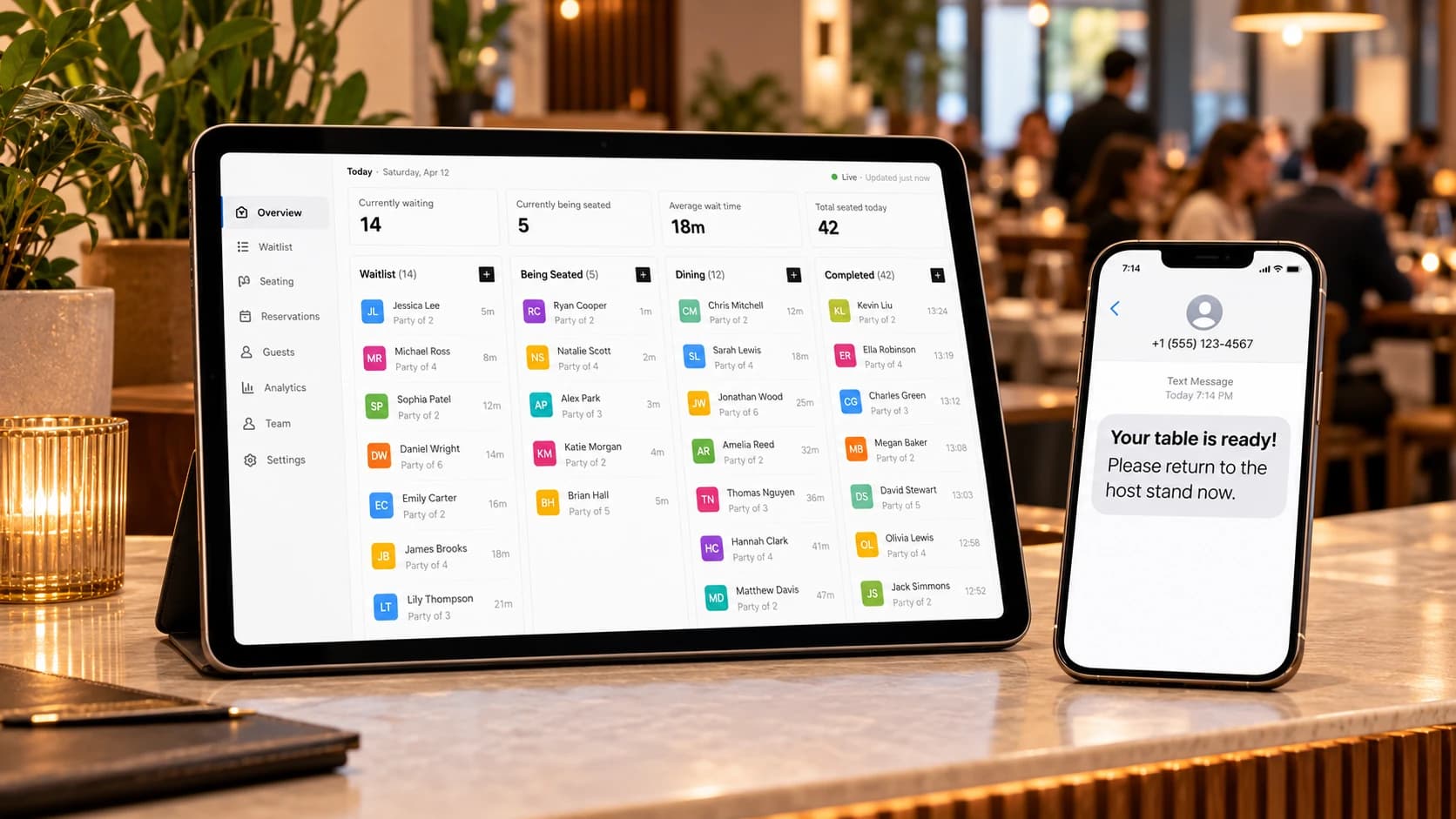
When the list is digital, the hold time and grace period stop being something the host has to remember. A rule can do it: if a party has been told their table is ready and hasn't appeared after ten minutes, the host gets flagged, or the party is marked as a no-show. In Queue Join these are automation rules, set per location, and they act once per visit, so nobody gets chased twice.
Buzzers, text or WhatsApp: how should you page guests?
Text or WhatsApp. Pagers keep guests within range of your building and have to be collected, cleaned and charged. A message reaches the guest wherever they are, on a phone they already carry. Pew Research found 98% of US adults own a cellphone and 91% own a smartphone [1], so the guest without one is the exception you handle by hand.
| Buzzer pagers | Calling names | Text (SMS) | ||
|---|---|---|---|---|
| Range | Usually the building and nearby | Earshot | Anywhere with signal | Anywhere with data |
| Guest can leave? | A short distance | No | Yes | Yes |
| Upfront cost | Buy the pagers and charging base | None | None | None |
| Running cost | Lost or broken pagers, batteries | None | Per message, around a cent each in the US | Per delivered message, set by Meta by country and category |
| Hygiene | Handed between guests, needs wiping each time | Nothing to share | The guest's own phone | The guest's own phone |
| Works without a phone? | Yes | Yes | No | No |
| Shows place in line? | No | No | With a status link | With a status link |
For a sense of text costs: Twilio's published US rate is $0.0083 per message segment, plus a carrier fee of a few tenths of a cent [2]. Meta charges for WhatsApp business messages per delivered message, priced by the recipient's country and the type of message [3]. On a waitlist, each party usually gets two or three messages a night: a confirmation, perhaps an update, and "your table is ready". That costs a lot less than replacing a pager that walked out in a coat pocket.
The best setups don't make you choose a channel. They try WhatsApp first, where the guest uses it, and fall back to an ordinary text if the WhatsApp message isn't delivered. Keep pagers or calling names for the few guests who don't want to give a number.
Tell guests what they're signing up for
When a host types a guest's number in, say what will be sent: "We'll text you when your table's ready, and you can reply STOP at any time." That's courteous, and it's what mobile networks expect. Our SMS opt-in policy sets out the wording.
How do you keep waiting guests from walking away?
Give them a reason to stay close and a reason to trust the wait. People leave a waitlist when they feel forgotten or when the quote starts to look like a guess, not because of the wait itself.
- Point them to the bar. A guest with a drink in hand is still your guest. Train hosts to offer it every time, and make sure the bar can hear (or see) when a table is called.
- Show them their place. A live status page, where the guest watches their position count down, does more for patience than any apology. It also stops the "how much longer?" visits to the host stand.
- Let them read the menu while they wait. Put a QR code to your menu by the door or on the bar. Guests who've chosen before they sit down order sooner, which shortens your turn time.
- Update them honestly. If a big table is lingering over coffee and the quote is slipping, send an update or tell them in person before they have to ask. A late update is better than no update.
- Make leaving easy. Let guests remove themselves from the list with one tap. A party that quietly gives up and doesn't tell you becomes a wasted call and a table held for nobody.
How do you handle party size, high chairs and accessibility?
Ask for them when the guest joins, in a field or two, and no more. Party size is essential. A note field handles the rest: high chair, wheelchair access, a buggy, a guest who can't manage stairs. Your host can then seat the right party at the right table, instead of finding out at the table.
Keep the form short. A guest joining on a phone at your door has little patience, and every extra question costs you people who give up halfway. The usual set is:
- Name and mobile number. Required.
- Party size. Required, with a sensible online maximum. Larger groups should speak to the host, because a party of ten needs a conversation, not a form.
- A note. Optional, for anything you should know.
In Queue Join, party size and the note are switches under the location's customer details, and party size has its own online maximum: bigger groups are asked to speak to a member of staff. You can add custom fields too, from a tick box to a list to choose from, but most restaurants won't need them. See registration fields for the options.
One more tip. If your two-tops, four-tops and big tables really do move at different speeds, run them as separate queues: "Tables for 1–2", "Tables for 3–4", "Tables for 5+". Each queue then gets its own wait estimate, which is the per-size quoting method above, done for you. Don't split for anything else, because every extra queue is another list your host has to hold in their head.
What should you do about no-shows and guests who leave the queue?
Treat them as two different things and count them separately. A no-show is a party you told their table was ready who never came back. A walk-away is a party who left the list themselves, or told you they were going. Both cost you a table for a few minutes, but they have different fixes.
For no-shows:
- State the hold time when guests join, and enforce it.
- Call or message once more at the end of the hold time, then seat the next party.
- If a lot of no-shows came from a long way off, limit online joins to guests near the restaurant.
For walk-aways:
- Check your quotes. If walk-aways cluster when the quote passes 45 minutes, your guests are telling you that's their limit. At that point, offer a booking for another night instead.
- Check the doorway. If guests can't find a place to wait comfortably, they leave.
- Look at the bar. If it's full too, you may simply be out of waiting room.
Reservation no-shows are a related but separate problem, with deposits, reminders and confirmation calls. Our guide on how to reduce no-shows covers those in detail.
How do you use waitlist data to plan busy nights?
Look at three numbers each week. Each one points to a decision.
| Measure | What it tells you | What to do with it |
|---|---|---|
| Covers per hour | How many guests you seated in each hour, waitlist and bookings together | Staff the kitchen and floor to the hours that actually peak, not the hours you think peak |
| Peak quarter-hours | The 15-minute windows when most parties joined the waitlist | Put your most experienced host on the door then, and plan prep so the kitchen isn't restocking at 7:45 |
| Walk-away rate | The share of waiting parties who left before being seated | Rising means quotes are too long or too optimistic. Compare with the wait times you quoted |
Add two more if you take bookings: the no-show rate on reservations, and how many walk-ins you seated at tables held for later bookings. The second is the real measure of how well your host juggles the two.
A digital waitlist records all of this as a side effect of running the night. In Queue Join, analytics shows parties joined and seated, no-show and cancellation rates, average wait, busiest hours and how long the queue grew, on higher plans.
What should you look for in a restaurant waitlist app?
Look for the things the host stand needs on a busy night, not the longest feature list. A restaurant waitlist app should do these well:
- Guests join without an app. A QR code or link, a short form, no download and no account.
- The host can add a party in seconds, including someone without a phone.
- "Table ready" messages that arrive. WhatsApp and text, with a fallback when one doesn't get through.
- A live status page for the guest, showing their place and an honest estimate.
- Party size on the form, with a cap for online joins.
- Walk-ins and bookings in one view.
- Rules for hold times and no-shows, so the host doesn't have to watch the clock.
- Numbers you can act on: covers, peak times, walk-aways.
- Clear pricing, with the cost of messages shown up front.
Queue Join does all of these. Guests join from a branded QR code, hosts run the night from a live waitlist, and the "your table is ready" message goes by WhatsApp first and falls back to a text. The wording of every message is written and maintained by us, so you choose which messages go out and on which channels rather than writing them. See how it works for restaurants and cafés, or the live queue management feature, and check current pricing for what each plan includes.
A Friday night, start to finish
Here's how the pieces fit, as an illustration.
At 6:45 the room fills. The host splits new walk-ins by size, and a couple joins the "1–2" queue by scanning the code on the door. They're told 15 to 20 minutes and go to the bar. A four joins from the car park and is quoted 30 to 35, because two of the four-tops are held for 8:00 bookings. At 7:05 a two-top clears. The host presses one button, and the couple's phone says their table is ready. They arrive within three minutes. At 7:40 a family of six who were quoted an hour leave the list from their phone. That frees the host to offer the next large party a booking for Saturday instead. At close, the night's numbers are already recorded: covers by the hour, the 7:30–7:45 peak, and two parties who walked away when quotes passed 50 minutes.
None of that needs a new way of working. It's the same host stand, with phone numbers, honest quotes and a list that remembers.
Frequently asked questions
Sources

About the author
Chris Hunter
CEO and founder of Queue Join, writing about running waitlists, bookings and customer messages for businesses that serve people in person.
More about Queue Join